 Rowlode
CSV files too big for Excel? Open them here.
Excel stops at 1,048,576 rows and Google Sheets at 10 million cells. Rowlode opens CSV files of millions of rows and several gigabytes in your browser, reading them straight from your disk. Scroll through every row, filter, remove duplicates, sort, merge files, and export the result – as CSV, or as Excel files split under the row limit. Your data is never uploaded.
Open a CSV for free Pricing ($12 once)
- Runs in your browser, offline – the app page cannot send data anywhere
- Millions of rows: the file is indexed, not loaded into memory
- Viewing, filtering, duplicate removal and sorting are free with no limit
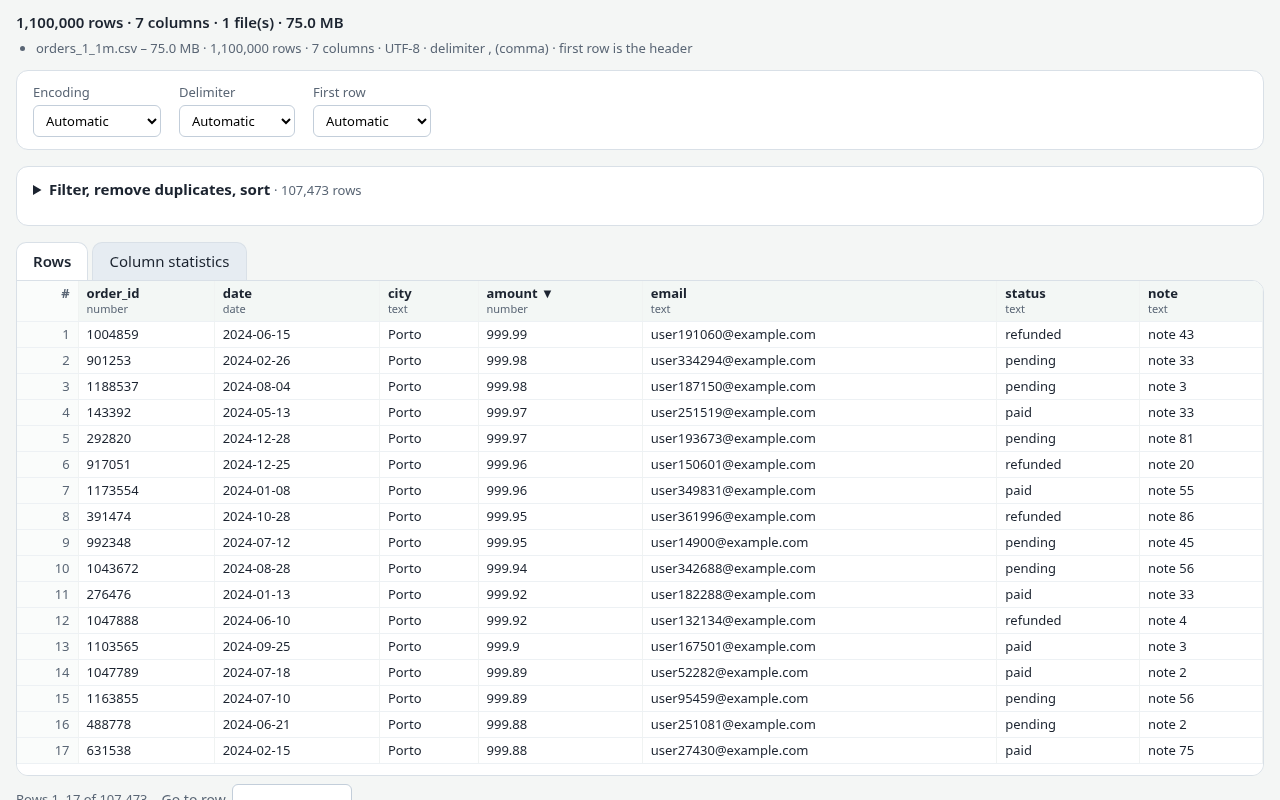
What Rowlode does
Open huge files
The file is read from your disk in slices and indexed, so a 2-million-row, 150 MB file opens in a few seconds and you can jump to any row. Multi-GB files work too; they just take longer.
Filter and search
Keep only the rows you need: contains, is, starts with, empty / not empty, greater or less than (numbers like 1.234,50 are understood), or a regular expression. Combine conditions with all / any.
Remove duplicates
By the whole row or by chosen key columns (for example the e-mail column), ignoring case and extra spaces if you like. The first occurrence is kept.
Split into parts
Every N rows, every N MB, or one file per value of a column (one file per country, per month…). Download the parts as one .zip or save them straight into a folder.
Excel-ready exports
Export to .xlsx with each sheet under Excel’s 1,048,576-row limit – as separate files or as several sheets in one workbook. Numbers stay numbers, leading zeros stay.
Fix the format
Change delimiter (semicolon to comma, tab, pipe), fix the encoding (Windows-1252, UTF-16, Shift_JIS… to UTF-8 with BOM), choose and reorder columns, merge files with the same columns.
How it works
- Open Rowlode and choose one or more CSV files.
- Rowlode detects the encoding, delimiter and header row, and indexes the file. You can scroll through all rows right away.
- Add filters, duplicate removal or sorting, and press Apply.
- Export: one file, or split by rows, by size or by a column’s values – as CSV, Excel, TSV or JSON.
Rowlode only reads your files – it never changes the originals. Results are new files that you save.
Guides
Good to know before you start
- Rowlode is a viewer and converter, not a spreadsheet: you cannot edit single cells or write formulas.
- Your browser stores the results while you export. Very large results (several GB) need that much free disk space; on phones and tablets memory is limited, so use a computer for big files.
- Sorting works for results of up to 5 million rows (filter first if you have more). Filtering, duplicate removal, splitting and exporting have no row limit.
- Dates are compared as text. That is correct for ISO dates like 2024-05-31, but not for 31/05/2024 – use “contains” or a regular expression for those.
- Duplicate detection compares 64-bit fingerprints of the rows. A false match is astronomically unlikely, but it is not a byte-by-byte comparison.
- Gzip / zip-compressed CSV files must be unzipped first. Excel cells hold at most 32,767 characters – longer values are shortened in .xlsx exports (CSV keeps them).
- If you are comfortable with a command line, free tools such as
split, csvkit or DuckDB can do many of these jobs too. Rowlode is for when you want it in a window, without installing anything.
Questions and answers
Is my CSV uploaded anywhere?
No. Rowlode runs in your browser. The app page has a Content Security Policy that blocks all network connections, and it keeps working with Wi-Fi off once loaded. See the privacy page.
What does the free version do?
Opening files of any size, scrolling, filtering, duplicate removal, sorting and column statistics are free with no limit. Exports in the free version contain the first 10,000 rows of your result, so you can check the output. A one-time $12 license exports every row.
How big can the file be?
There is no fixed limit in Rowlode; the file is read in slices, not loaded at once. It has been tested with 2 million rows (150 MB) and multi-GB files. What limits you is your disk space for the results and, for sorting, memory.
Which browsers work?
Current Chrome, Edge, Firefox and Safari on Windows, macOS, Linux and ChromeOS. Saving parts straight into a folder needs Chrome or Edge; other browsers download a .zip.
Is Rowlode made by Microsoft?
No. Rowlode is an independent tool and is not affiliated with Microsoft, Google or Apple.